#791 Updated HYPERVISOR FIFA 18 v1.0.57.57320

Genres/Tags: Sports, Soccer, Third-person, 3D
Companies: Electronic Arts, EA Canada
Languages: RUS/ENG/MULTI17
Original Size: 48.8 GB
Repack Size: from 24.9 GB
Download Mirrors (Direct Links)
- Filehoster: DataNodes (Speed & Usability) [Use IDM]
- Filehoster: FuckingFast (REALLY Fucking Fast 🙂 )
- Filehoster: MultiUpload (10+ hosters, interchangeable) [Use JDownloader2]
Download Mirrors (Torrent)

Discussion and (possible) future updates on CS.RIN.RU thread
Screenshots (Click to enlarge)




Repack Features
- Based on EA v1.0.57.57320 release: 48.8 GB, thanks to boobooman!
- Hypervisor Bypass (INTEL & AMD) by DenuvOwO + Anadius emu applied over
- Many antiviruses, including Windows Defender are now marking HV files as rootkits, rendering games unplayable. To avoid it either turn off AV completely, or add source/target installation folders to exclusions
- VBS.cmd script v1.7.2 added
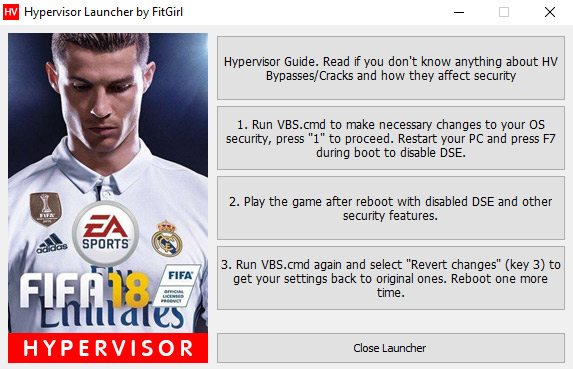
- Custom launcher added for easier HV steps processing
- 100% Lossless & MD5 Perfect: all files are identical to originals after installation
- NOTHING ripped, NOTHING re-encoded
- Selective Download feature: you may skip downloading and installing of voiceover packs you don’t need. English commentaries are included by default
- Smaller archive size (compressed from 48.8 to 24.9~35.7 GB, depending on selected components)
- Installation takes from 15 minutes (on 32-threads CPU) up to one hour (on 8-threads CPU)
- After-install integrity check so you could make sure that everything installed properly
- HDD space after installation: up to 48.8 GB
- Commentary language can be changed in “anadius.cfg”
- Video and audio settings can be changed via Config icon, placed on desktop
- At least 2 GB of free RAM (inc. virtual) required for installing this repack
Having issues with my launcher?
Then do the following steps manually:
- Make sure you have virtualization tech enabled in your BIOS: VT-x for Intel or AMD-V (SVM) for AMD
- Run “VBS.cmd” in the game folder – you might want to download fresh version here: https://fitgirl-repacks.torrentbay.st/hypervisor-guide/
- Press 1 to make necessary changes to the system
- Reboot and in the loading menu press F7 to disable DSE
- Run “FIFA18.exe”
- Play
- Run “VBS.cmd” again and press 3 to revert made changes
- Reboot in the normal, secure mode
What is a Hypervisor Bypass?
Please read this article before proceeding with downloading and installation:
https://fitgirl-repacks.torrentbay.st/hypervisor-guide/
Backwards Compatibility
This repack IS NOT backwards compatible with my previous FIFA 18 repack.
